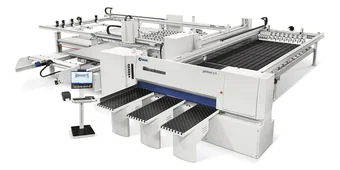
SCM gabbiani beam saws

What sheet sizes do you cut, and how do you load them? Compare the g and gt horizontal beam saws with the a 3 angular system for rip cutting and crosscutting.

Watch the saws in operationMaestro software for panel cutting

Choose a saw model
SCM panel saw gabbiani g 2
Horizontal beam saw
SCM panel saw gabbiani gt 2
Version with a loading lift table
Layout dimensions for gabbiani g 2
SCM layout drawing for gabbiani g 2, with dimensions A, B and C.
Cutting dimensions and drawing references (mm)
Cutting dimensionsABC
3200 × 3200566337614567
3800 × 3800626343615279
4500 × 4300696350615780

A, B and C refer to the dimensions marked on the SCM drawing. Allow additional space for moving panels in and out and for service access.

SCM drawing and table (PDF, EN, p. 34)
SCM specifications for gabbiani g 2
Layout dimensions for gabbiani gt 2
SCM layout drawing for gabbiani gt 2, with dimensions A, B and C.
Cutting dimensions and drawing references (mm)
Cutting dimensionsABC
3200 × 1850566345136740
3200 × 2440 (optional)566345138100
3800 × 1850626351136740
3800 × 2440 (optional)626351138100
4500 × 2440696358138100

A, B and C refer to the dimensions marked on the SCM drawing. Allow additional space for moving panels in and out and for service access.

SCM drawing and table (PDF, EN, p. 34)
SCM specifications for gabbiani gt 2

gabbiani g 2 / gt 2

A horizontal beam saw for cutting individual panels or stacks. The gt 2 incorporates a lifting table for loading.

Cutting length
3,200, 3,800 or 4,500 mm
Blade projection
115 mm (115 version) or 128 mm (130 version)
Loading
gt 2 lifting table: stack height up to 600 mm
Brochure g 2 / gt 2 (PDF, EN)Installation dimensions · PDF, p. 34 (EN)
Choose a saw model
SCM panel saw gabbiani g 3
Horizontal beam saw
SCM panel saw gabbiani gt 3
Version with a loading lift table
Layout dimensions for gabbiani g 3
SCM layout drawing for gabbiani g 3, with dimensions A, B and C.
Cutting dimensions and drawing references (mm)
Cutting dimensionsABC
3200 × 3200630039614567
3800 × 3800690045615279
4500 × 4300760052615780

A, B and C refer to the dimensions marked on the SCM drawing. Allow additional space for moving panels in and out and for service access.

SCM drawing and table (PDF, EN, p. 30)
SCM specifications for gabbiani g 3
Layout dimensions for gabbiani gt 3
SCM layout drawing for gabbiani gt 3, with dimensions A, B and C.
Cutting dimensions and drawing references (mm)
Cutting dimensionsABC
3200 × 1850630045016750
3200 × 2440 (optional)630045018110
3800 × 1850690051016750
3800 × 2440 (optional)690051018110
4500 × 2440760059208110
5600 × 2440910073938200

A, B and C refer to the dimensions marked on the SCM drawing. Allow additional space for moving panels in and out and for service access.

SCM drawing and table (PDF, EN, p. 30)
SCM specifications for gabbiani gt 3

gabbiani g 3 / gt 3

A horizontal beam saw for batch cutting. The gt 3 has a lifting table and offers a longer cut on selected configurations.

Cutting length
3,200, 3,800 or 4,500 mm. A 5,600 mm cut is also available on the gt 3 145 and gt 3 165.
Blade projection
130, 145 or 165 mm
Loading
gt 3 lifting table: stack height up to 600 mm
Brochure g 3 / gt 3 (PDF, EN)Installation dimensions · PDF, p. 30 (EN)
SCM panel saw gabbiani a 3

gabbiani a 3

An angular system with separate rip-cut and crosscut stations. It suits batch production where the transfer between the two cuts is important.

Rip-cut length in the brochure
a 3 130 · 3,200 or 4,500 mm
a 3 165 · 4,500 or 5,600 mm
Crosscut dimension
2,440 mm
Blade projection
130 or 165 mm
Is a 5,600 mm rip cut available on the a 3 130?

SCM’s online table also lists a 5,600 mm rip cut for the a 3 130. The linked brochure lists this length for the a 3 165. If you need 5,600 mm on an a 3 130, include your panel format in your enquiry so we can confirm the configuration.

Brochure a 3 (PDF, EN)Technical data · PDF, p. 33 (EN)Left- and right-hand angular layouts (English PDF, pp. 30–32)SCM specifications for gabbiani a 3

Gabbiani beam saws in operation

See how the SCM machines cut panels, load thin sheets and turn a panel on an angular line. Each film shows the configuration named below.

From a cut list to a cutting program for a gabbiani beam saw

Take a batch of cabinets. For the sides and shelves, list the part sizes, quantities, material and stock sheet size. In the office, Maestro optiwise uses these inputs to generate cutting patterns. You can compare patterns according to whether material yield or cutting time matters more for that job.

At the saw, the operator opens the prepared program in Maestro active cut and follows the cutting operation on the machine interface.

Which Maestro optiwise package fits your workflow?

Optiwise
Import a cut list from a fixed CSV template, prepare the cutting pattern for a single-blade saw and export the machine program.
Optiwise Advanced
Import orders from Excel or a CSV file with a custom column layout. This package also adds time calculation and cutting patterns for an angular system such as the gabbiani a 3.
Optiwise Pro
Export programs to several saws from one office or plan work for a cell with an SCM flexstore horizontal storage system.

If you already use a different optimiser

For the gabbiani g 2 / gt 2 and g 3 / gt 3, SCM specifies PTX files at revision 1.14 or later for the Maestro converter cut module. To check compatibility, tell us the saw model, the name of your optimiser and the PTX revision it exports.

What to include in your enquiry

Include the largest sheet length and width, material, individual panel thickness, stack height per cut and panels per shift. For automatic loading, include the space available around the saw.

Blade projection is the height of the blade above the worktable. The loading table has a separate stack height limit. We check the stack height per cut for your material and machine configuration.

All furniture production machinery